
Image Format Selection
Image Format Selection determines which file format will be returned when requesting transformed media. PixelFiddler automatically selects the optimal format based on your preferences, browser capabilities, and fallback rules.
When you request an image transformation, PixelFiddler uses a priority-based system to determine the output format. This ensures you get the best possible format for your use case while maintaining compatibility across different browsers and devices.
The format selection follows this priority order:
- Query parameter (
formatorf) - Accept header from the browser
- Fallback format (configured in media settings)
- Original format (if supported by browser) - only when fallback set to AUTO
- JPEG (universal fallback) - only when fallback set to AUTO
Format Selection Priority
Section titled “Format Selection Priority”1. Query Parameter (Highest Priority)
Section titled “1. Query Parameter (Highest Priority)”Explicitly specify the desired format using the format query parameter:
/sources/my-source/media/image.png?format=WEBP/sources/my-source/media/image.jpg?f=AVIF2. Accept Header
Section titled “2. Accept Header”When no format is specified in the query, PixelFiddler checks the browser’s Accept header to determine supported formats:
Accept: image/avif,image/webp,image/png,image/svg+xml,image/*,*/*;q=0.8The system will select the best supported format from the Accept header, prioritizing modern formats like AVIF and WebP when available.
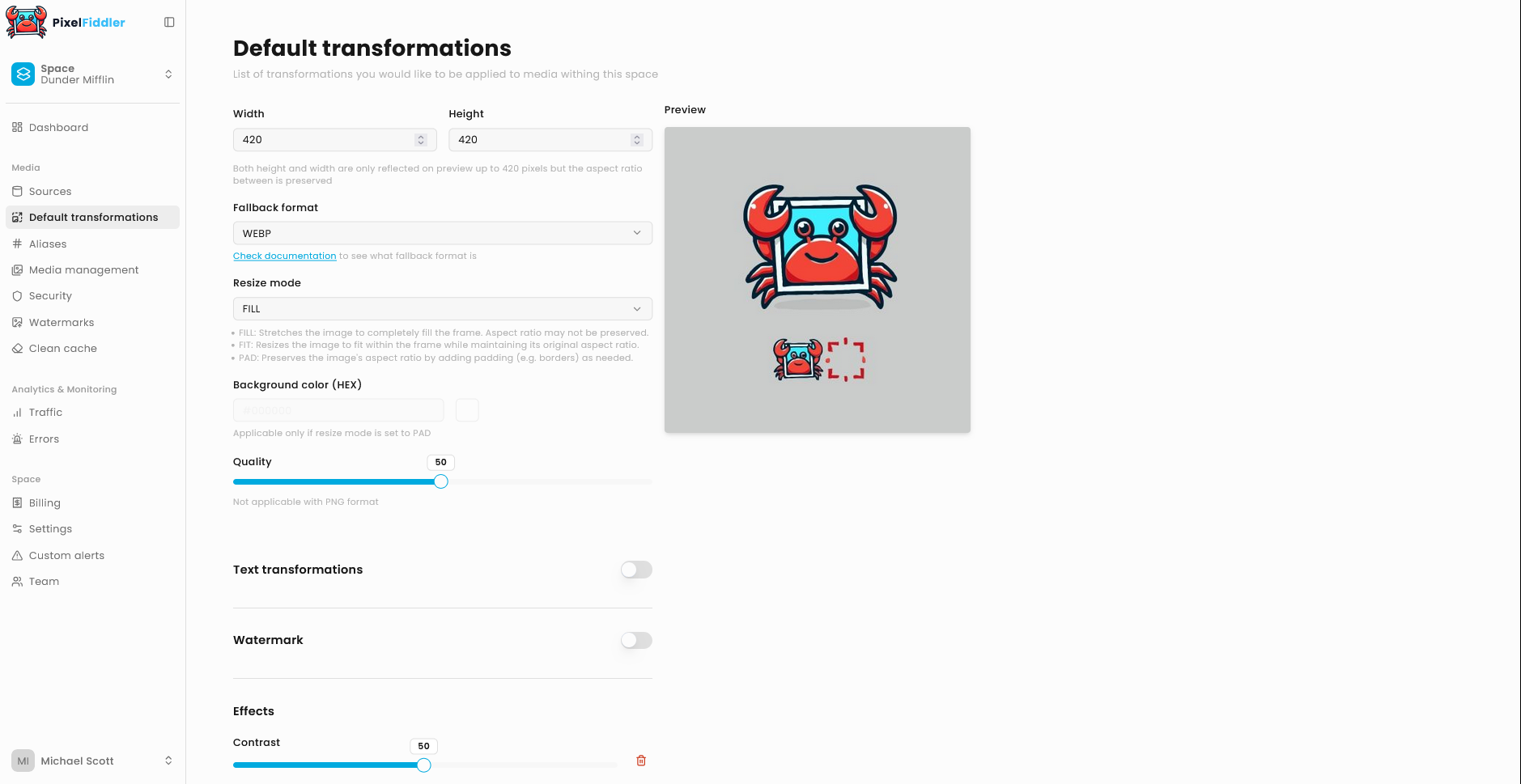
3. Fallback Format
Section titled “3. Fallback Format”Configure a default fallback format in your media settings:
This format is used when:
- No query parameter is specified
- Accept header doesn’t specify image preferences
- Browser doesn’t support modern formats
- Auto format is NOT being used
4. Original Format (Auto Mode Only)
Section titled “4. Original Format (Auto Mode Only)”When using Auto fallback format, if no other format is specified and the original image format is supported for output, PixelFiddler will maintain the original format.
5. JPEG (Auto Mode Only)
Section titled “5. JPEG (Auto Mode Only)”When using Auto fallback format and all other options are exhausted, JPEG is used as the universal fallback format due to its broad browser support.
Auto Format Selection
Section titled “Auto Format Selection”You can use “Auto” fallback format which lets PixelFiddler choose the optimal format by following the complete priority chain:
Auto fallback format follows:
- Query param
- Accept header analysis
- Original format (if supported)
- JPEG fallback
Non-Auto selection follows:
- Query param
- Accept header analysis
- Fallback format if it’s different than AUTO
Browser Support Matrix
Section titled “Browser Support Matrix”| Format | Chrome | Firefox | Safari | Edge | IE11 |
|---|---|---|---|---|---|
| JPEG | ✅ | ✅ | ✅ | ✅ | ✅ |
| PNG | ✅ | ✅ | ✅ | ✅ | ✅ |
| WebP | ✅ | ✅ | ✅ | ✅ | ❌ |
| AVIF | ✅ | ✅ | ✅ | ✅ | ❌ |
| GIF | ✅ | ✅ | ✅ | ✅ | ✅ |
Format-Specific Considerations
Section titled “Format-Specific Considerations”- Best compression for photos
- Slower encoding - consider for static assets
- Limited browser support in older versions
- Good compression with broad support
- Faster encoding than AVIF
- Excellent for web delivery
- Universal compatibility
- Good for photos with acceptable file sizes
- No transparency support
- Lossless compression
- Supports transparency
- Larger file sizes for photos
- Best for graphics with few colors
- Animation support
- Limited to 256 colors
- Large file sizes - consider WebP for animations when supported
Best Practices
Section titled “Best Practices”✅ Recommended
Section titled “✅ Recommended”- Use auto-selection for general web delivery
- Specify format only when you need guaranteed format consistency
- Configure AVIF or WebP as fallback for modern browsers
- Test format support across your target browsers
- Monitor file sizes and loading performance across formats
❌ Avoid
Section titled “❌ Avoid”- Forcing PNG for photographs (use JPEG/WebP/AVIF instead)
- Forcing JPEG for graphics with transparency (use PNG/WebP instead)
- Using GIF for static images (inefficient compression)
- Ignoring browser capabilities when selecting formats
Troubleshooting
Section titled “Troubleshooting”Unexpected Format Output
Section titled “Unexpected Format Output”Issue: Receiving JPEG when expecting WebP
- Check if WebP is supported in the Accept header
- Verify fallback format configuration
- Ensure query parameter is correctly specified
Issue: Large file sizes with PNG output
- PNG may be selected for images with transparency
- Consider WebP for better compression with transparency support
- Check if original image actually needs transparency
Format Compatibility Issues
Section titled “Format Compatibility Issues”Issue: Browser can’t display returned format
- Verify browser support for the selected format
- Check Accept header content
- Consider configuring a more compatible fallback format